Overview
This article will go over the two different ways of assigning equipment manually. This method differs from assigning equipment while setting up the activity because it allows you to have different equipment assigned based on various dates or date bands.
Assigning Equipment to Activities
First, ensure you have created the pieces of equipment that you would like to attach to an activity. This article will provide you with steps for assigning equipment to an activity as a whole.
Here, we will show you how to attach equipment to an activity on a particular date or date band. This is useful if you need to manage equipment assignments manually, on a day-to-day basis.
There are two ways of assigning Equipment to activities in Zaui. The first is via the staff schedule, which is handy for bulk assignments. The second is directly on the home page dashboard, which is handy for on-the-fly assignment.
Assigning Equipment from the Staff Schedule
- Once your Equipment is created, select Activities > Scheduling Tools > Staff Schedule.
- Select either a Single Date or Multiple Dates you wish to assign your equipment to.
- Click on the
 icon next to the relevant activity to assign your newly created equipment.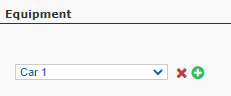
- Click on Process to save this configuration.
Assigning Equipment from the Dashboard
- Once your Equipment is created, return to the main dashboard on your home page and select the date you wish to assign a piece of equipment on.
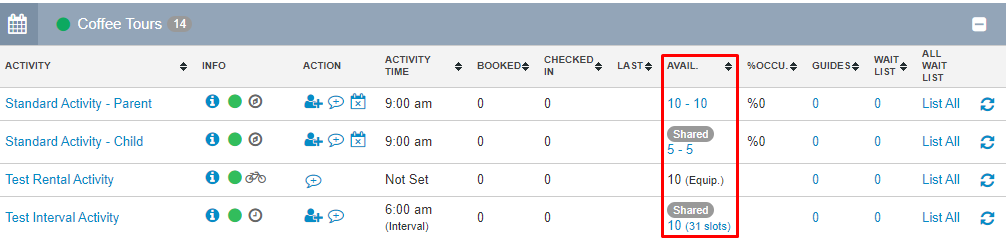
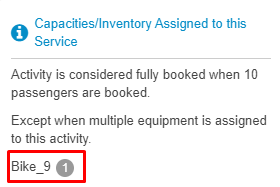
- Find the activity you need to assign a piece of equipment to and hover over the number listed (ie - 10-10) to see if a piece of equipment is already assigned to this activity, on this date.
- Click on the number (ie - 10-10) if you wish to remove, add or change the piece of equipment assigned.
- The next page will provide you with the option to remove the piece of equipment currently assigned, add or replace the piece of equipment as well as a list of equipment that is unavailable for assignment and the reasons why.
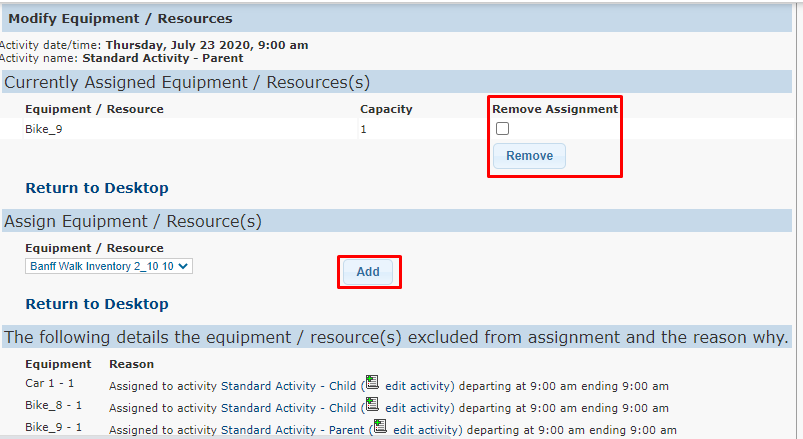
- Once your changes are made, click on Return to Desktop to see the changes made to that activity, on that particular date.
 |
You can assign more than one piece of equipment to a tour. For example, your fleet includes two 24-seat busses, and your maximum tour capacity is 48 seats. You can assign your two busses to that one tour. |
How to Assign Equipment to Multiple Activities at once
- From the navigation bar, select Settings > Company Info.
- Scroll down to the Zaui User Interface Settings to the Employee/Equipment Assignments section. This is where you can enable multiple assignments for equipment onto activities that may have overlapping departure and end times.

- Don't forget to save your changes.
|
If you offer tours where multiple pieces of equipment are assigned (ie - 2 x 24 pax busses for tours of up to 48 pax), check out this article to learn more about resource allocation straight from your manifest! |